


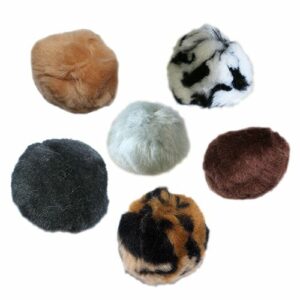
SKU: 283070
Декоративные перья, Помпоны, Стебли, Синелипомпоны Зверята Titanum(283070)
Первоначальная цена составляла 22,00 MDL.15,00 MDLТекущая цена: 15,00 MDL.
Акриловые помпоны. Цвет: микс одноцветных и пятнистых помпонов, диаметр: микс. Упаковка 54 шт.
Доставка и оплата
- Доставка по Кишиневу осуществляется при заказе на сумму от 1000 лей.
- Оплата осуществляется наличными
Похожие товары
-
Декоративные перья, Помпоны, Стебли, Синели
помпоны 25 мм фиолетовые Titanum(283064)
Первоначальная цена составляла 36,00 MDL.16,00 MDLТекущая цена: 16,00 MDL. -
Декоративные перья, Помпоны, Стебли, Синели
проволока декор. 3х30см 10шт.Titanum
Первоначальная цена составляла 61,00 MDL.28,00 MDLТекущая цена: 28,00 MDL. -
Декоративные перья, Помпоны, Стебли, Синели
Помпоны 18мм оранжевые Titanum
Первоначальная цена составляла 12,00 MDL.5,00 MDLТекущая цена: 5,00 MDL. -
Декоративные перья, Помпоны, Стебли, Синели
Помпоны с блёстками 18мм желтые Titanum
Первоначальная цена составляла 12,00 MDL.5,00 MDLТекущая цена: 5,00 MDL.


Micah –
Cheers, A lot of facts!
casino en ligne
You said it adequately.!
casino en ligne fiable
Regards. I enjoy this.
casino en ligne
You actually said that well!
casino en ligne
You actually said that wonderfully!
casino en ligne
Very good info, Appreciate it.
casino en ligne
Many thanks, Wonderful stuff!
casino en ligne francais
You actually explained it really well!
casino en ligne
Many thanks! I appreciate it!
casino en ligne
Nicely put. Regards.
casino en ligne
rlamxmvwr –
The Big Bass Bonanza slot features a standard layout of 5 reels and 3 rows, with numerous paylines that vary by bet size. The game allows players to customize their stake, giving everyone, from casual gamers to high rollers, a chance to reel in big wins. Here’s a quick breakdown of the gameplay mechanics: Accessing the free spins bonus round in Bigger Bass Bonanza is achieved when the player manages to gain three or more Scatter symbols in a single spin. Three Scatters award ten free spins, four awards 15, and five give 20 free spins. After taking a close look at the Big Bass Bonanza slot, we can see why it’s become one of Pragmatic Play’s most popular titles. The first of the Big Bass franchise, it hooked us in with its straightforward 5×3 set-up, animated visuals, and upbeat soundtrack.
https://ponceca.com.pe/2026/03/09/le-jeu-du-penalty-casino-une-experience-immersive-a-ne-pas-manquer/
If you’ve tried Wink AI Video Enhancer but want more power or fewer restrictions, Picwand AI Video Enhancer is worth checking out. Whether you’re upgrading old memories or preparing content for social media, it can give your videos a clean, polished look without needing any editing skills. InShot Video Editor & Video Maker is a free video utility application wherein you can create or enhance the quality of your video clips… Wink — Video Enhancing Tool provides a range of editing tools, such as AR filters, stickers, and video effects, that you can use to enhance your videos. Additionally, it includes a feature called Live Photo Beautification, allowing you to boost and edit live photos. For those who love recording selfie videos, Wink includes advanced beauty tools to enhance your appearance. You can whiten teeth, remove blemishes, and even change eye color to ensure you always look your best on camera.
ownrwszao –
Wave goodbye to unwanted sounds and music in your videos! Mute your video clips instantly. One-Click audio syncing makes lining up video and music tracks a breeze. A library of drag-and-drop modern, stylized transitions helps speed up cutting and gives videos a professional look. Use multicam editing to quickly edit together footage from different angles and create a music video from a performance. This music video editor includes a wide variety of title templates perfect for lyric music videos and video effects to make your DIY music video look like a Hollywood production. We’ll share what to consider when video editing and guide you on how to streamline your post-production process. And if you’re ready to upgrade your setup, we have guides on the best video editing equipment. Happy with your music video? Perfect, now you’re ready to download and share! Click ‘Export’ at the top-right corner of the editor and your video will render in seconds. Get sharing!
https://www.yildizhanplastik.com/palm-casino-real-money-en-recension-for-svenska-spelare/
Speed’s where it gets real. InShot churns out a 30-second 1080p clip in under a minute, steady as a rock—your audience sees it fast. VN’s 4K flex takes longer, maybe two minutes for the same, and if your battery’s low or RAM’s tapped, it might freeze mid-render. InShot is the reliable shotgun; VN’s the sniper rifle—deadly when it works, risky when it doesn’t. For trust, InShot edges out; for quality chasers, VN’s worth the gamble. If you’re working with professional video-editing software, adding even the simplest video transition may take you hours of pressing wrong buttons and digging for advice. Certainly not a pleasant experience. With Movavi Video Editor, adding a transition takes about 3 seconds – you just drag and drop the transition you want between the clips. Yes, it really is that simple. To learn more about different types of transitions, follow the link below: How to choose transitions for your video
fhfvjbjiy –
If you’re looking to download an old version of Alight Motion, you can do so easily and safely by following the link provided. All the APK files available are free from viruses and fully functional, so you don’t need to worry about anything. If you already have the latest version of Alight Motion installed and want to switch to an older version, you’ll first need to uninstall the current version. After that, you can go to your app settings and click on “allow from an unknown source” to download and install the older version. Downloading Alight Motion MOD APK can open up a world of creative possibilities, but it’s important to do it right. To avoid any security issues or getting stuck with outdated versions, follow these simple steps to make sure you’re downloading from safe and reliable sources.
https://leetcode.com/u/SophiaCocteua/
Apple Final Cut Pro is another impeccable video software for Mac offering creative professionals an easy breakthrough. Apple Final Cut Pro brings the best plugin effects for the users. The additional characteristics of this MacBook video editing software include: I love this app and I prefer it for all my video editing for social, even over desktop tools. It’s very powerful with a super friendly UI. Privacy practices may vary, for example, based on the features you use or your age. Learn More The developer does not collect any data from this app. This app is so good for my business I had to take the time to recommend this app to ALL business owners! Makes advertising so easy! I loooovvvveeeee this! You must get this app. The best рџ’ѓрџЏЅ Editing software is your best bet to make the video stand out from the crowd. For this very reason, the section shall introduce ten video software for Mac, which will be for both amateur and professional video editors in town. Stay with us as we explore the features of their tools. Let’s start!
qrnptrsqm –
Copyright ©2025 Freepik Company S.L. All rights reserved. Try not to use too many animations on a single slide or those that are overly flashy. For example, you don’t want images and objects flying in from all directions or text that spins to the point it’s unreadable. The key is to use animations that enhance your presentation without distracting from the message. Transitions and animations are wonderful tools at your fingertips when creating a slideshow in Google Slides. However, like every tool, they need to be used with care. Here’s what you should be wary of: How to introduce yourself in a presentation as a student Work smarter, not harderCreate stunning videos in minutes with time-saving tools that do the heavy lifting for you. Most PowerPoint animations aren’t supported in Slides. Google Slides’ animation list is: Appear, disappear, fade in, fade out, fly in from top, left, bottom and right, fly out from top, left bottom and right, zoom in, zoom out and spin. If you import a PowerPoint presentation with animations that are not on this list, Google Slides will find what it deems a suitable replacement. More often than not, the animation will be replaced with Fade. Delays on animations will be preserved, though once converted there is no way to change them in Google Slides and no way of adding new ones.
https://www.mtmeventplanning.com/561/balloon-de-smartsoft-el-juego-de-inflar-globos-y-ganar-dinero-en-peru/
Transform any vector shape into another! Synfig gives you powerful tools for full control on your vector artwork. Just set the key positions and inbetween frames will be calculated automatically. Animation apps are software applications designed to create animated content, ranging from simple 2D animations to complex 3D visual effects. These tools provide users with a digital canvas and a set of features to draw, animate, and edit characters, objects, and scenes. Animation apps typically offer a combination of drawing tools, timeline editors, and rendering capabilities to produce smooth and visually appealing animations. Many also allow users to edit audio clips, enhancing the overall audiovisual experience. Last on our list of Adobe 2D animation programs is Adobe After Effects. After Effects is one of the most well known Adobe softwares primarily for its ability to create graphics animations, title animations, and VR animation capabilities. AE is also simple to use with Adobe Photoshop, Adobe Premiere Pro, and Adobe Creative Suite in general.
ypqmdueny –
YouTube Video Editor in 2012. Yes, anyone can start using Kapwing’s online Video Editor for free. There are some limitations around features and video length for users on the Free plan, and a small watermark is applied to exports. Upgrade to a Pro account to gain access to the full editing studio, including all AI-powered features. YouTube Video Editor in 2011. Pretty cool now @RiversidedotFM can do TikTok Shorts style videos on the fly using AI. AI literally automating video editing now! VideoShow AI Video Editor Marques Brownlee is my all-time favorite geek YouTuber, and for a good reason: his talents for narration and storytelling are impressive. Plus, the quality of his videos is simply off the charts. Expand your audience reach and share YouTube videos on Instagram in a few clicks. Our online video editor lets you crop and reformat your video for Instagram in minutes.
https://doc.projectsegfau.lt/s/kFYKdhPDIu
Fast&Slow Motion Video Tool has four salient features. First, it plays the video you want to watch in slow motion. Second, you can adjust the video where you need to speed up or slow down. For example, you can adjust the speed of the original video between 1 8 and 8 times. Software coupons Your simple video editor for creating wow videos Platform: iOS (iPhone and iPad)Why It’s Great:For Apple users, iMovie is a go-to app for video editing, and it includes an excellent slow-motion feature. The app provides a clean and intuitive interface that’s ideal for beginners. You can slow down specific parts of your clips and add music or transitions for a professional touch. SlowCam is an easy to use app with few settings for slow motion video recording. It lets you shoot videos in slow motion right on the way. To do this you need to:
tobnpwcio –
Just like its predecessor, Bigger Bass Bonanza uses a fishing theme. The reels continue floating just below the ocean’s surface, but the background image has changed. This time, it appears players are casting off closer to the shore, which is made clear by palm trees and neon-lit buildings. Visuals are equally crisp and brightly coloured, with the new 1980s style soundtrack adding more dynamics to the gameplay. Find the dream catch of the day in Bigger Bass Bonanza slot, the Pragmatic Play slot that’s certainly not fishy! Return to Player (RTP) is the percentage a game returns to users over time, and volatility refers to the frequency and size of potential payouts. Both stats are visible on most Betfair slot titles, allowing players to choose games that suit their preferred pace or session length.
https://auntsandysskinks.com/moana-casino-login-guide-and-review-for-uk-players/
For UK players seeking an engaging slot with straightforward gameplay and rewarding bonus features, Big Bass Bonanza is a solid choice. Its easy-to-understand mechanics and exciting free spins round make it accessible to a wide audience. Coupled with strong licensing and availability at trusted UK casinos, it remains a standout offering in Pragmatic Play’s portfolio. The first thing that hit about Bigger Bass Splash was the main character chappie at the home page, decked out in socks, slip-on shoes, a rope on belt, a Lei around the neck, a cowboy hat, and a cocktail in hand. The guy’s been put together with even more random spare parts than the game he fronts. From there, we head into a sight which BBB fans will be familiar with — a bubble-lined gaming grid, elevator music, reef, sea, and more bubbles. It gets the job done.
kqkjgnceg –
If you have played the original Big Bass Bonanza, there’s nothing new here in terms of gameplay. The Christmas edition keeps the same base game and features, although that’s certainly not a bad thing. The game is an excellent introduction for those new to online slots, with the Free Spins feature the big fish you ultimately want to catch. Like most online slots, the Bigger Bass Blizzard Christmas Catch pays from left to right. All you need is to have at least three matching symbols on a payline. Nonetheless, the game adds a few spices to the gameplay. The graph shows the distribution of the multiplier hit frequency. In other words, the probability of different win multipliers to drop. It allows you to estimate the most frequent multipliers in Bigger Bass Blizzard – Christmas Catch, and how frequently they are awarded during Free Spins.
https://www.vespa-reifen.de/crazy-star-casino-login-uk-review-your-gateway-to-online-fun/
Not to be confused with the sample library and music maker app of the same name, the Splice mobile video editing app—initially developed by GoPro—features a healthy range of editing features and a large free music library. The app offers a full-featured free trial but all users must eventually switch to a paid subscription. If you’re looking for a free video editor with a wide range of editing tools and other features, go no further than KineMaster. One may begin a project in a variety of aspect ratios, from the theatrical 16:9 to the Instagram-perfect 1:1. It is among the free video editing apps for iPhone. Adobe Express is Adobe’s free video editor. With it you can trim your video and add music and messaging to it. You can also merge video clips and resize your videos for dozens of destinations.
owrvvzlts –
Some editors support naming timelines. By default, auto-editor will use the name «Auto-Editor Media Group». For premiere resolve and final-cut-pro export options, you can change the name with the following syntax. Try it if you want an easy video editor to download and use right away.Download Movavi Video EditorDownload Movavi Video Editor for Mac Synthesia is the #1 AI Video Communications Platform. Our AI Video Generator enables everyone to create professional videos without mics, cameras, actors or studios.Using AI, we’re radically changing the process of video content creation, making it scalable and affordable while maintaining high quality. Recording my screen feels seamless. I can capture full HD video, whether demoing software, walking through a PowerPoint presentation, or explaining a process step by step. The cursor effects and click highlights are brilliant for training videos, making it easy for viewers to follow along.I also love Camtasia’s built-in templates and asset library. It comes with royalty-free music tracks, motion graphics, and annotations that make my videos look polished without much effort. Features like pan-and-zoom, transitions, and callouts let me add a touch of flair without overcomplicating things.
https://www.helpdeskweb.nl/forum/member.php?action=profile&uid=9040
Big Bass Bonanza is available to play now on mobile on the MrQ app. When you sign up, you can play over 900 real money mobile slots and casino games. Licensed and regulated in Great Britain by the Gambling Commission under account number 57924 for GB customers playing on our online sites. For customers outside of Great Britain, we licensed by the Government of Gibraltar and regulated by the Gibraltar Gambling Commission under licence numbers RGL 133 and RGL 134. $ €1000 bonus You’ll find 12 active paylines within the 5×4 grid of the Bigger Bass Bonanza slot machine. Symbols pay from left to right. Only the highest win is paid per line but when winning on multiple paylines, all active wins are added together to give you a bigger total prize. Bigger Bass Bonanza by Pragmatic Play offers an entertaining and engaging slot experience tailored for UK players. Its well-designed interface, generous bonuses, autoplay demo feature, and accessibility across top UK casinos create a compelling package. Whether you’re new to online slots or a veteran looking for fresh gameplay, Bigger Bass Bonanza is worth a cast. Dive into the waters of fun and fortune, and see if you can reel in the big wins!
pgwcrfxqd –
Bigger Bass Bonanza is an aquatic-themed online slot developed by Pragmatic Play. Building on the success of its predecessor, it takes players on an exhilarating fishing adventure. The game is designed with a 5×3 layout and offers 10 paylines, making it easy for players to engage with. Big Bass Bonanza is the game that started the Big Bass series and comes with a high 96.71% RTP rate. With 2,100 x bet max wins, the gameplay is superb with a great Free Spins feature. It’s also the subject of several no wager free spins offers. Here are some common questions about the bigger bass bonanza demo that players often ask: Big Bass Bonanza is the game that started the Big Bass series and comes with a high 96.71% RTP rate. With 2,100 x bet max wins, the gameplay is superb with a great Free Spins feature. It’s also the subject of several no wager free spins offers.
https://docs.monadical.com/s/VIZ3DBgzLy
Yes, Alight Motion iOS is available to download and install the latest pro version with all the premium features, keyframe animation, and visual effects of Alight Motion editing. Just like Alight Motion Android, you can download it on iOS Devices. In this post, I’ll go over the differences between Alight Motion vs After Effects, two excellent video editor apps. You can then decide which suits your video production needs best. Alight Motion is a video editing app with huge potential user-wise. Sometimes device compatibility, user personnel preference, and ease of use lead users to install the Alight Motion premium APK old versions. If that is the case you got what you just searched for! Premium ActivatedAfter downloading from my site, Alight Motion is already premium activated; you don’t need to buy subscriptions or any activation for the Alight Motion. Follow the steps above to install the latest fully unlocked app from my site, and start using the pro version for free.
xwpbjjphe –
Download Tempo App Mod APK No watermark latest version and edit your videos in simple steps. You will have diverse & unique transitions and effects to achieve professional-grade videos. Auto Video Editor People are more likely to engage, share, and comment on video content. Translating your music’s unique story into a compelling video can be expensive and complex. AI music video generators act as a creative co-director, allowing you to experiment with visual concepts and produce official videos or tour visuals that match your aesthetic, all while maintaining full artistic control and working within an indie budget. This app is available directly from the official App Store. Since the official app stores maintain their own rigorous security standards and review processes, we rely on their trusted distribution platform rather than performing additiona scans. You can download with confidence knowing this comes straight from the verified source.
https://md.globenet.org/s/mLMke3FY4
App is HORRIBLE – AVOID. I am a paying customer. I spent 15-20 hours editing a video, only for the app to not allow me to load the video when I finished it – I get stuck on a never ending loading page whenever I try to load a new video. Take advantage of our full AI video editor by streamlining video creation and transforming the styles of your videos into extraordinary content. Free stock photos & videos you can use everywhere. Browse millions of high-quality royalty free stock images & copyright free pictures. How to edit videos with the free video editor: This app has all the important video editing features you need, like splitting, trimming, merging, and changing video speed. What’s more, you can also edit videos shot on a green screen and add (Picture-in-Picture) PIP overlays or other backgrounds. The app can handle up to 4K and 60 FPS videos.
tkwjekwku –
Photo animation brings movement to still images. It adds life, depth, and emotion. To animate a photo, you don’t always need to have specific skills or expertise. Many user-friendly photo animation apps now make it accessible to everyone. «Next, we have LeiaPix, and this one’s super fast. Go to convert.leiapix, upload your image, and in seconds, you’ll have a depth animation. There’s an advanced editor to customize the animation further, but the basics are enough to get some really cool effects. All of this comes together in a new section of the app called the Create tab, which will serve as a hub for these tools and any other AI features Google may release in the months ahead. In the near term, it will include the Photo to Video and Remix features alongside the existing collage and highlight video creators. But as Veo gets smarter and Google’s confidence grows, the possibilities could expand into any number of AI enhancements such as extended video clips, voiceovers, or multi-image stories.
http://www.uni-display.com/?p=121468
Input your text, upload images, or select from our vast library of pre-made assets. Our AI will automatically animate your content, bringing it to life with smooth transitions and professional movements. The best thing is that Animaker lets you apply animation in both the entry and exit of the texts. However, the text animation settings don’t end here – Animaker offers an amazing Smart Move option that allows you to customize the text movement on your screen. Sadly, most of the Smart Move options are hidden behind the paywall. You need visuals for every song you put out — the more the better. This is the best way to reach new audiences and stay on top of the mind of your listeners. With neural frames, you can bring your musical vision to life, in an audio-reactive way. neural frames feels like a digital audio workstation for video. A game-changer for Spotify canvas, clips for social media, and full-length video clips alike.
sqfweogwihxv –
Play the Bigger Bass Blizzard Christmas Catch free demo slot—no download required! Try Reel Kingdom Pragmatic Play’s latest game, enjoy risk-free gameplay, explore features, and learn game strategies while playing responsibly. Read our expert Bigger Bass Blizzard Christmas Catch slot review with ratings for key insights before you play. Bigger Bass Blizzard is an online video slot game played across 4 rows with 5 reels and 12 fixed paylines. With an RTP of 96.08% and a volatility level that ranks 5 out of 5, this game has the potential to pay out significant rewards, up to 4,000 times your bet. “Bigger Bass Blizzard – Christmas Catch” is a fishing-themed online slot game developed by Pragmatic Play. This 5-reel, 4-row slot features 12 fixed paylines and offers an immersive winter-themed experience with a twist on the popular “Bigger Bass Bonanza” series. The game boasts a unique blend of festive elements and fishing adventures, catering to players seeking both thematic diversity and engaging gameplay mechanics.
https://jobs.emiogp.com/author/reilesgepi1988/
So far, we’ve discussed how to animate on Google Slides. Now, let’s take a look at how to add transitions. A transition in slides refers to the animation applied when switching from one slide to another during a presentation. These effects include fades, slides, zooms, flips, and more. Yes, you can add multiple animations to a single object in Google Slides. After selecting the object and adding the first animation, click “Add animation” in the Animations panel to apply additional animations. A transition has to specify a start and end ConstraintSet for the transition. A transition can also specify how to modify the animation in other ways, such as how long to run the animation or how to animate by dragging views. Let’s look at how to use Google Slides tools for a presentation. Google Slides works much like desktop presentation applications. The left sidebar of Google Slides displays the slides that you’ve made, and the body of the screen displays the slide you’re currently working on.
naghnhyaroyo –
Cartoonize Video Object is a tool that applies cartoon-style effects to certain subject of video footage, transforming real-life objects and scenes into vibrant animations. Toon Boom Ember, introduced as a beta test in early spring, is now available as an add-on to users of Storyboard Pro 25 and Harmony 25. These opt-in AI tools allow professional teams to work with fewer interruptions, iterate faster and focus on the creative process. Rather than attempt to replicate the work which artists and animators contribute to a project, Ember’s purpose is to assist. 21 day free trial with Storyboard Pro 25 and Harmony 25. With features like animated stickers, frame duplication, and various overlays, PicsArt Animator enables you to create beautiful animations and cartoons quickly. It is one of the animation apps for mobile phones.
https://forums.wolflair.com/members/ochoamenao.159264/#about60
Add it to your websiteA good video can help convert customers, whether you’re driving traffic to your website, amazon page, or YouTube page. Share a product demo, interview employees or customers, or explore your business’s origin story by turning your images into a video. Choose a file or drag it here We’d be happy to help. Please email our Customer Experience team so we can look into the issue and assist you — pixaloop.support@lightricks. Instagram stories provides users with the opportunity to share photos and videos that disappear after 24 hours. With the new highlights feature, Instagram users also have the option to add their story to a highlights section under their bio, making it visible until the user decides to delete it. FakeMe: Face Swap AI Photo App YouCam Perfect is a free photo animation app for anyone who wants to animate a photo and create a stunning selfie. You can animate your photos to add a stunning sparkle, falling leaves, flowers blowing in the spring breeze, or even wings. There are animated effects, animated stickers and animated wraparounds.
kxiknlmucfvj –
CapCut Premium APK is one of the best video editing software programs that I personally use to make my videos professional. The 3D zoom transitions and blurry templates I love the most. By using these effects, my videos got trending on Instagram and TikTok. When you see that your video is looking great, export it in Ultra HD or 4k 60 fps quality. Kapwing’s online Video Editor works with all popular file types for video (MP4, AVI, MOV, WebM, and more) Provides the option to add on NewBlue TotalFX, featuring 1,500 presets in 177 video plugins in one comprehensive toolbox. You’ll find titling, stabilisation, transitions, filters, background generators, and dozens of video effects. Feature-rich video editor for mobile One of the best video editors for Android PrettyUp — Video Body Editor is a free multimedia app designed for users looking to adjust their appearance in pictures and videos. It combines powerful photo editing and video editing features into a single platform, making it a versatile and convenient choice.
https://hub.docker.com/u/jonahprescott?_gl=1*1b9fvtg*_gcl_au*MTIxMTM4MTEyMy4xNzgwNDg2NjM3*_ga*MjgwNDYyNDQyLjE3ODA0ODY2Mzc.*_ga_XJWPQMJYHQ*czE3ODA0ODY2MzYkbzEkZzEkdDE3ODA0ODY2OTUkajEkbDAkaDA.
An easy-to-use, powerful free video editor KineMaster is one of the top competitors of CapCut Video editor with a bunch of the best features for editing. It is designed for beginners to professional editors to use easily. If you want to edit a project, it allows you to add images, videos, and text at the same time. The Plus point is that it is easy to use because of its beginner-friendly interface. You can find a comparison post of CapCut vs KineMaster to see which one is best for you. Pick a template from the collection and add your headlines, images, and video clips. Then, customize the text and music. Preview the video and make any necessary changes. Once you’re done, download the video and share it with your audience. To promote your news segments or your news agency, you can use the video ad maker free of charge. If you have a mobile news app you want to advertise, look no further than the app promo video maker.
nqolwiinfkbe –
Trimming your video to the perfect length is easy with Facetune’s video cut editor. Simply select the part of the video you want and adjust it to your desired length right in the app. Making a video involves planning your content, shooting footage, and editing the final product. With tools like Renderforest’s video maker, you can create videos online by choosing a template, customizing your footage, and adding effects and music to produce a polished video. Clipchamp (which is owned by Microsoft) is a web-based video editor that works in Google Chrome, Microsoft Edge, or in a browser wrapper on Windows 11. There are some inherent limitations in editing video using a web browser that even Clipchamp can’t overcome. Success largely depends on the speed and reliability of your internet connection, and your computer’s ability to handle a fairly demanding web app.
https://doc.anagora.org/s/5rj-weSuw
To see what a video looks like with altered speed, you can change the playback options in your favorite video player. If you want to edit videos and come up with amazing projects for platforms like YouTube, you’ll need a handy video editing app. For simple edits, Canva is one of the best free video editing software options out there. What the video editor lacks in editing capabilities, it makes up for in beautiful, ready-made video templates. Does the app also speed up videos? VSCO Members can use the Speed tool to adjust video playback speed — speed up video or slow down video without sacrificing quality. No more choppy frames and you can export or publish to your profile with ease. 1. Open a video in QuickTime Player2. Click on the Window menu3. Go to Show A V controls4. Use the Playback speed slider to speed up or slow down the video